

Guided joining
Make an invitation, paste it into Add to fleet on the new firewall, compare a 6-digit code and approve. Over the Fleet tunnel, Tailscale or a direct connection.


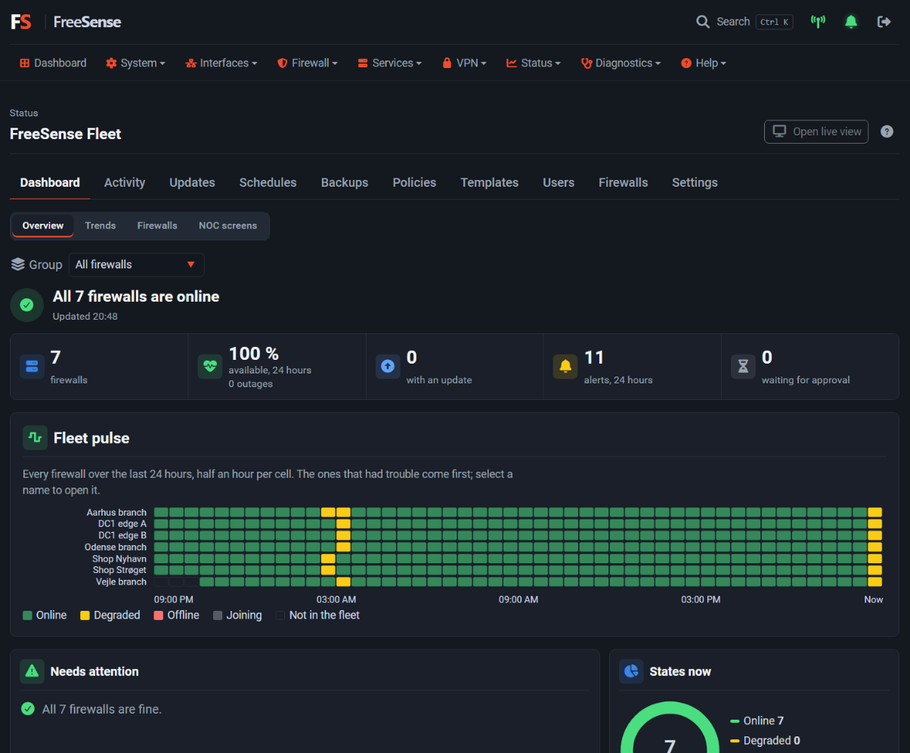
Every firewall, one control centre, and 100% yours. Fleet is self-hosted: not a cloud service, with no account and nothing sent to FreeSense. Join firewalls with a pasted invitation, watch them live, then back up, update and check them against policies together. Firewalls call the controller, so they can sit behind NAT.
One firewall runs the Fleet controller, an optional package. Every other firewall joins it with the agent that is already part of FreeSense, so managed firewalls need nothing installed.
Make an invitation, paste it into Add to fleet on the new firewall, compare a 6-digit code and approve. Over the Fleet tunnel, Tailscale or a direct connection.
Groups, 24-hour availability, alerts and internet quality for every firewall, plus a wall-screen view that pages by itself.
Maintenance windows, rolling reboots, templates and schedules. Risky changes run under commit-confirm and roll back on their own.
Audit, fix or lock settings across the fleet. Locked rules cannot be edited on the firewall itself.
Set up CARP with state and configuration sync from two firewalls in a step-by-step guide, optionally over an encrypted WireGuard link.
Configuration backups of every firewall, kept on the controller with retention rules.
Most central managers live in a vendor's cloud. Fleet does not. The controller is a FreeSense system that you run, and everything stays on it.
There is no FreeSense-hosted Fleet service, no sign-up and no subscription. The controller is an optional package on a FreeSense system you own.
The inventory, history, alerts, backups, policies and keys live on the controller under /fleet. Removing the package does not delete the fleet.
Fleet makes no connection to FreeSense servers. The invitation points at your controller, and each firewall pins its certificate.
Firewalls reach the controller over the Fleet WireGuard tunnel, a tailnet or directly. Joining needs your invitation and a 6-digit approval code.
It is an ordinary FreeSense system, so you choose where it lives. The firewalls open the connection to it, so only the controller has to be reachable.
Fleet works the same in every setup. Tailscale, ntfy and Telegram are used only if you choose them.
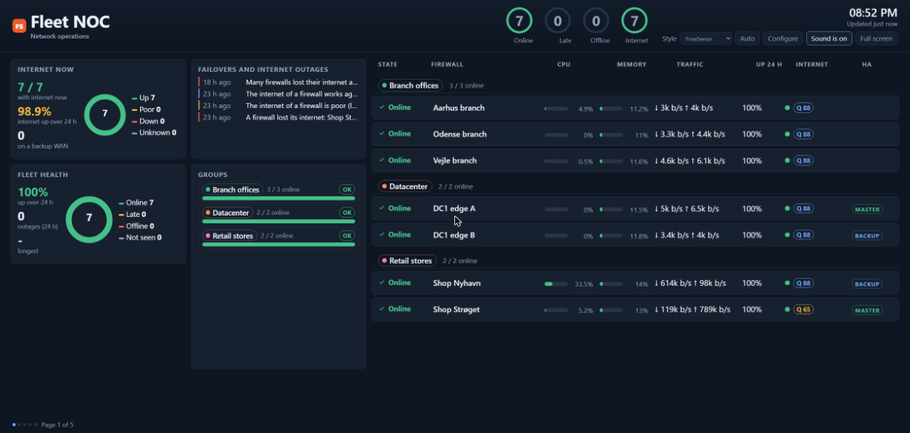
Health, internet failovers and every firewall by group, with CPU, memory, traffic and HA role. It pages by itself and can sound an alert when something goes down.
On one firewall, install FreeSense Fleet from System → Package Manager and switch it on in the guide.
Make an invitation on the controller and paste it into Add to fleet on the new firewall.
Compare the 6-digit code on both screens, approve, and the firewall appears on the dashboard.
Fleet is part of the Development line, is experimental and unsupported, and is not in Stable 1.1. It arrives with FreeSense 1.2.